The easiest way to get USDC onto Arbitrum, Solana or Hyperliquid is usually not a bridge at all: withdraw USDC from your exchange directly on the network you need. When you do need to move USDC between chains yourself, use the official route, which for native USDC is Circle’s Cross-Chain Transfer Protocol (CCTP): it burns USDC on one chain and mints the same amount on the other, with no wrapped tokens in between. For Hyperliquid, a connected wallet deposits USDC on Arbitrum through the Deposit button in its app, and Hyperliquid’s docs say many exchanges and bridges can also withdraw USDC to it directly.
This guide covers each route step by step, explains how CCTP works, and lists the mistakes that cause most lost funds when moving stablecoins between chains.
If you’re new to this, the key idea is that USDC exists separately on each blockchain. USDC on Ethereum and USDC on Solana are not interchangeable until something moves them across, and sending to the wrong chain is the most common and least recoverable mistake people make.
This is not financial advice. Moving funds between blockchains carries risk, and mistakes are usually irreversible.
First choice: withdraw on the right network
Most large exchanges let you withdraw USDC on several networks: Ethereum, Arbitrum, Solana, Base and others. If your destination is on one of those, choose it at withdrawal and you skip bridging entirely.
- On the exchange, choose Withdraw, then USDC.
- Select the network that matches where you’re sending: Arbitrum for Hyperliquid deposits, Solana for Solana DEXs.
- Paste your wallet address for that network and double-check the first and last characters.
- Send a small test, wait for it to arrive, then send the rest.
This route has one fee, the exchange’s withdrawal fee, and no extra bridge risk. It’s the cheapest and safest option when it’s available.
The wallet you’ll need
Before moving USDC anywhere, set up a self-custody wallet that supports your destination:
- For Arbitrum and Hyperliquid: an EVM wallet such as MetaMask or Rabby. The same address works on Ethereum, Arbitrum, Base and other EVM networks.
- For Solana: a Solana wallet such as Phantom. Some wallets support both EVM chains and Solana in one app, with separate addresses for each.
Write down the seed phrase on paper and store it safely before you send anything. Losing it means losing access to whatever you bridged. Our self-custody wallet guide walks through setup.
How Circle’s CCTP works
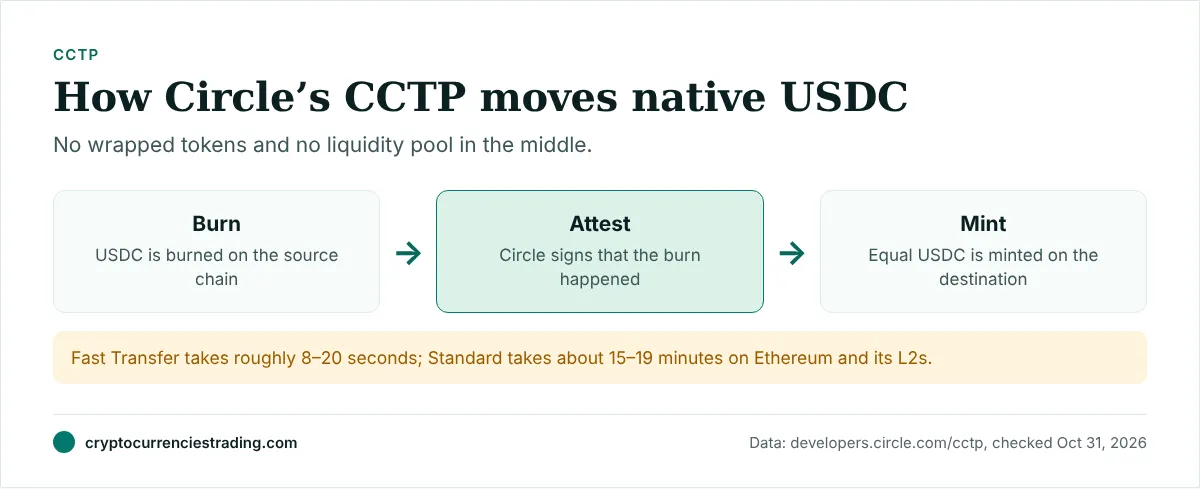
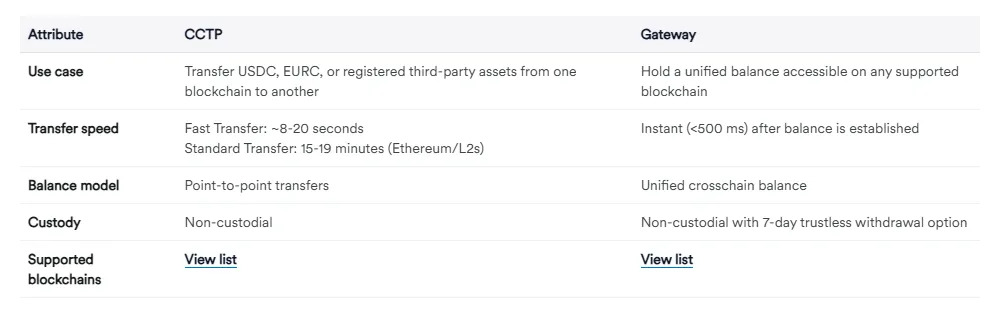
Circle, the issuer of USDC, runs a protocol for moving native USDC between supported chains. According to Circle’s developer documentation, CCTP burns USDC on the source chain and mints an equal amount on the destination chain, without liquidity pools.
Two speeds are available:
- Fast Transfer: roughly 8 to 20 seconds.
- Standard Transfer: about 15 to 19 minutes on Ethereum and its layer-2 networks, and the more cost-efficient option.
For standard CCTP USDC transfers, the fee is deducted from the amount transferred. You also pay gas on the source chain, and sometimes on the destination.
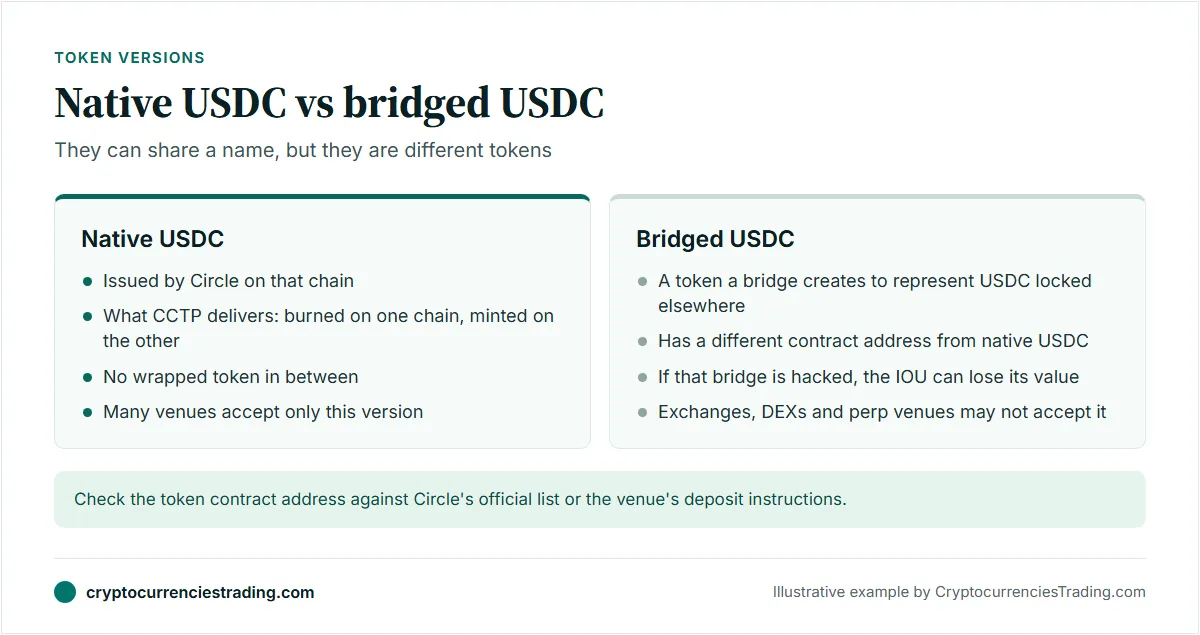
Why it matters: older bridges often lock USDC on one chain and issue a wrapped IOU on the other. If that bridge is hacked, the IOU can lose its value. With CCTP you receive the same native USDC that Circle issues on the destination chain. Many wallets, bridge apps and exchange deposit screens use CCTP behind the scenes; look for “native USDC” or “CCTP” in the route details.
Getting USDC to Hyperliquid
Hyperliquid’s onboarding guide describes these routes:
- Straight from an exchange or bridge: many centralized exchanges and bridges support withdrawals to Hyperliquid, either to HyperCore or to HyperEVM. Check whether your exchange lists Hyperliquid as a withdrawal network.
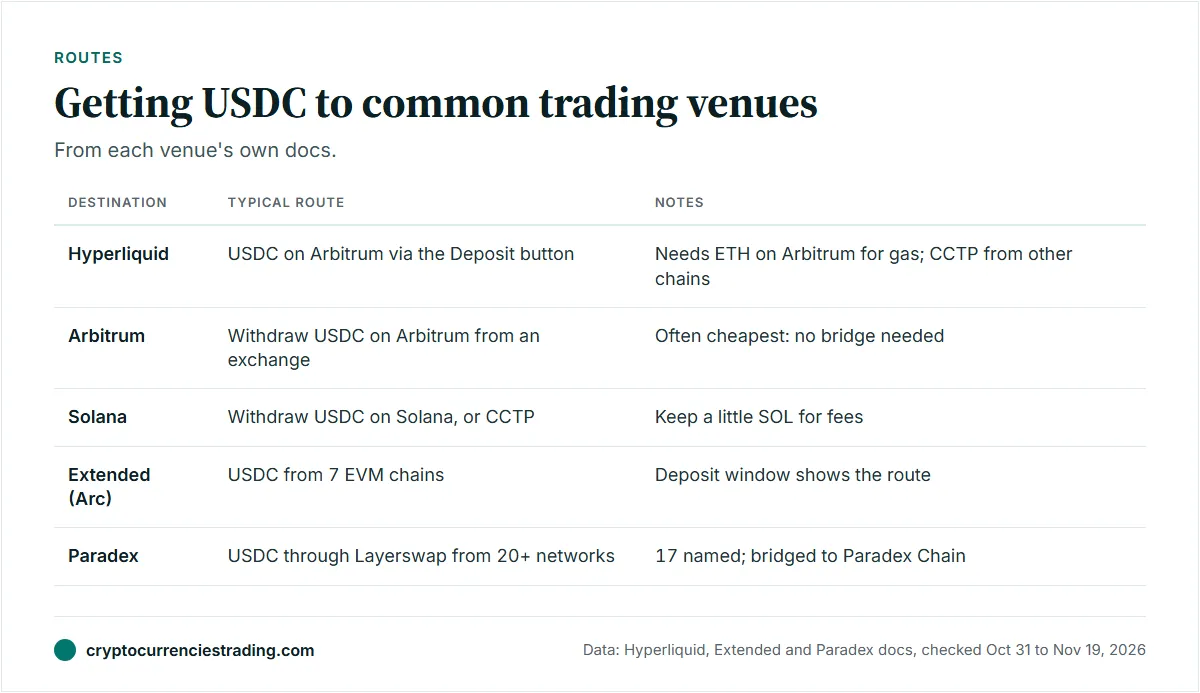
- From a DeFi wallet: USDC deposits are made on Arbitrum. Connect your wallet, click “Enable Trading” and sign the gasless message, then enter an amount, click “Deposit” and confirm in your wallet. You need a little ETH on Arbitrum to pay gas for the deposit. Deposits arrive as USDC on HyperCore, and trading itself is gas-free.
- With an email login: send USDC from Arbitrum, Ethereum, Base or Polygon to the deposit address shown in the Deposit window.
- From other chains: transfer USDC via CCTP, which requires the source chain’s native gas token.
- Other assets: you can send BTC, ETH, SOL, AVAX, ZEC and other listed assets to the destination address shown, then sell them for USDC on Hyperliquid.
Hyperliquid’s USDC developer docs now name CCTP as the preferred way to bring USDC onto Hyperliquid and mark the older Arbitrum bridge deprecated. Circle’s CCTP docs say CCTP deposits to Hyperliquid have no minimum. For a wallet deposit through the Deposit button, Hyperliquid’s deposit FAQ still says USDC comes from Arbitrum only and that deposits under 5 USDC are lost.
If your exchange doesn’t list Hyperliquid, the simplest path for most people is to withdraw USDC on Arbitrum straight to your wallet, keep a little ETH on Arbitrum for gas, then use Hyperliquid’s Deposit button. Withdrawals may carry small gas fees depending on the chain and method.
Note that Hyperliquid is not available to US persons; see perp DEXs and US availability.
Getting USDC to Arbitrum
Arbitrum is a common hub for perp DEXs and DeFi.
- Best: withdraw USDC from your exchange on the Arbitrum network.
- From Ethereum or another chain: use a CCTP-based route in your wallet or a reputable bridge app, choosing native USDC as the output.
- Get some ETH on Arbitrum for gas. Many exchanges also let you withdraw ETH on Arbitrum directly.
Watch out for bridged USDC variants. Some chains have both native USDC and an older bridged version under a similar name. Exchanges, DEXs and perp venues may only accept one of them. Check the token contract address against Circle’s official list or the venue’s deposit instructions.
Getting USDC to Solana
Solana uses different addresses from Ethereum-compatible chains, so this is where wrong-network mistakes are most costly.
- Best: withdraw USDC from your exchange on the Solana network to a Solana wallet such as Phantom.
- From an EVM chain: use a CCTP route that supports Solana, sending from your EVM wallet and receiving in your Solana wallet.
- Keep a little SOL in the wallet for transaction fees.
Never paste a Solana address into a withdrawal set to an Ethereum-compatible network, or the reverse. Most exchanges block obviously invalid addresses, but don’t rely on it.
Getting USDC to other perp venues
Many perp DEXs build bridging into their deposit window:
- Extended, now on Circle’s Arc chain, accepts USDC from Ethereum, Arbitrum, Base, Arc, BNB Chain, Polygon and Avalanche, and moved to native USDC on Arc via CCTP in October 2026.
- Paradex bridges USDC to its own chain. Its bridges page says Layerswap, its main deposit route, supports 20+ networks, and it names 17 of them.
- GMX offers a GMX Account so you can trade Arbitrum markets with deposits from Ethereum, Base or BNB Chain.
When the venue offers a built-in route, it’s usually the simplest choice: it shows the fee and expected time, and you deposit straight into your trading account.
Costs compared
Each route has different costs. Typical patterns:
- Direct exchange withdrawal: one withdrawal fee set by the exchange, often a flat amount per network. Layer-2 and Solana withdrawals are usually cheap; Ethereum mainnet withdrawals usually cost more.
- CCTP Standard: a fee deducted from the amount, plus gas on the source chain. Slower but cost-efficient.
- CCTP Fast: much quicker; check the fee the app shows before choosing it over Standard.
- Third-party bridges and aggregators: a fee or spread built into the quote, plus gas. Some are fast and cheap; check whether the USDC you receive is native.
- Venue deposit windows: convenient, with the fee and route shown before you confirm.
For small amounts, a flat fee can be a large share of the transfer. Moving $20 through Ethereum mainnet can cost more in gas than it’s worth. Batch your transfers and choose cheap networks where you can.
A worked example: exchange to Hyperliquid
You have 500 USDC on a centralized exchange and want to trade on Hyperliquid.
- On the exchange, withdraw a small amount of ETH on Arbitrum to your wallet for gas.
- Withdraw 20 USDC on Arbitrum to the same wallet as a test.
- Open Hyperliquid, connect the wallet, click Enable Trading and sign.
- Deposit the 20 USDC and wait for it to show in your Hyperliquid balance.
- Withdraw the remaining 480 USDC on Arbitrum from the exchange and deposit it the same way.
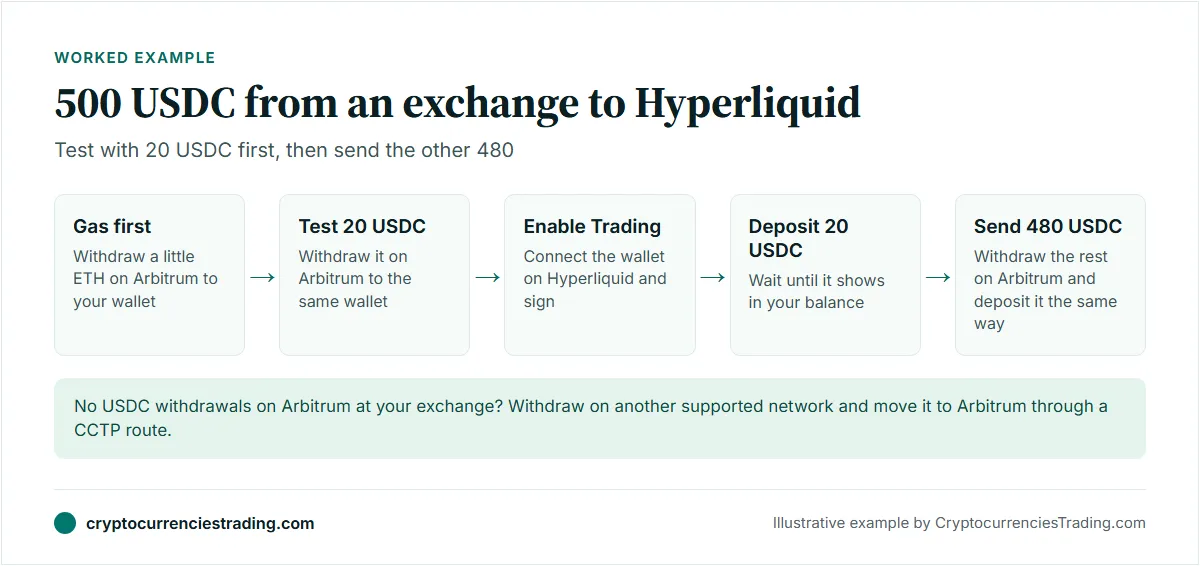
If your exchange doesn’t support USDC withdrawals on Arbitrum, withdraw on another supported network and move it to Arbitrum via a CCTP route, or, with an email login, send from Arbitrum, Ethereum, Base or Polygon to the deposit address shown in Hyperliquid’s Deposit window.
Moving USDC back
The reverse trip follows the same logic. Withdraw from the trading venue to the network your exchange accepts, then deposit to the exchange using that same network. Before sending, check the exchange’s deposit page: it lists the networks it accepts for USDC, and sending on any other network can mean lost funds. Keep a little gas token in your wallet so you can make the final transfer.
Bridging safely
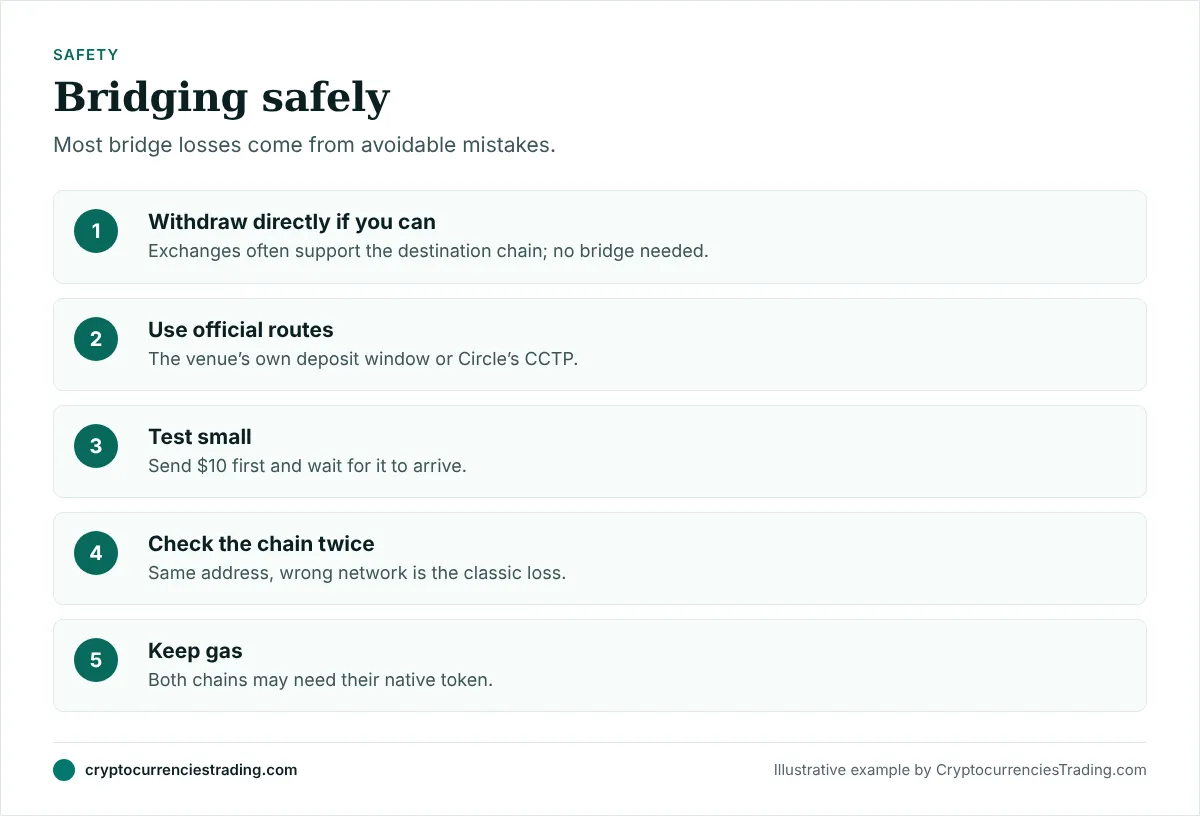
- Use official routes. The venue’s own deposit window, your exchange’s direct withdrawal, or a well-known CCTP integration. Avoid bridges you found through ads or direct messages.
- Bookmark sites. Fake bridge sites are a common way to drain wallets.
- Test small. Send $10 first and wait for it to arrive.
- Check the network twice. The same 0x address exists on many chains; the network you choose decides where the funds go.
- Keep gas on both sides. You may need the native token on the source chain to send and on the destination to do anything next.
- Read approvals. Bridging tokens on EVM chains often requires a token approval. Approve only what you need, and revoke old approvals later. Our self-custody wallet guide shows how.
What to do if a transfer seems stuck
- Find the transaction on the source chain’s block explorer and confirm it succeeded.
- Check the expected time. Standard CCTP transfers take about 15 to 19 minutes on Ethereum and its layer-2s; other routes vary.
- Check the destination on its block explorer, and make sure your wallet is showing the right network.
- Look for a “claim” step. Some routes need you to complete the transfer on the destination chain.
- Contact support of the app or venue you used, through its official channels only. Anyone who contacts you first offering to “recover” funds is almost certainly a scammer.
Common mistakes
- Sending on the wrong network, especially between Solana and EVM chains.
- Depositing bridged USDC to a venue that only accepts native USDC.
- Running out of gas on the destination chain and being unable to move funds.
- Using unofficial bridge sites found through search ads.
- Sending your whole balance first instead of a test amount.
- Leaving unlimited approvals on bridge contracts you no longer use.
Frequently asked questions
Do I need a bridge to deposit to Hyperliquid?
Often not. Some exchanges can withdraw USDC to Hyperliquid directly. Otherwise, withdraw USDC on Arbitrum from your exchange, then use Hyperliquid’s Deposit button. You’ll need a little ETH on Arbitrum for gas. Email-login users can send USDC from Arbitrum, Ethereum, Base or Polygon to the deposit address shown.
What is CCTP?
Circle’s Cross-Chain Transfer Protocol. It burns USDC on one chain and mints the same amount on another, so you receive native USDC rather than a wrapped version.
How long does bridging USDC take?
With CCTP, Fast Transfer takes roughly 8 to 20 seconds and Standard about 15 to 19 minutes on Ethereum and its layer-2s. Other routes vary.
Is bridging safe?
Using official routes and native USDC reduces risk, but mistakes such as sending to the wrong network are usually irreversible. Test with a small amount first.
What’s the difference between native and bridged USDC?
Native USDC is issued by Circle on that chain. Bridged USDC is a token created by a bridge to represent USDC locked elsewhere. They can share a name but have different contract addresses, and many venues accept only native USDC.
Can I bridge USDC from my exchange directly to Hyperliquid?
Sometimes. Hyperliquid’s onboarding guide says many exchanges and bridges support withdrawals to Hyperliquid, to HyperCore or HyperEVM. If yours doesn’t, withdraw USDC on Arbitrum to your own wallet and then deposit it with Hyperliquid’s Deposit button.
Why can’t I see the USDC I bridged?
Usually because your wallet is set to a different network, or the token isn’t added to your wallet’s list. Switch networks or add USDC by its official contract address.
Sources
The figures in this guide come from these pages, checked on November 19, 2026.
- hyperliquid.gitbook.io/hyperliquid-docs/onboarding/how-to-start-trading
- hyperliquid.gitbook.io/hyperliquid-docs/for-developers/api/usdc
- hyperliquid.gitbook.io/hyperliquid-docs/support/faq/deposit-or-transfer-issues-missing-lost/deposited-usdc
- developers.circle.com/cctp/concepts/cctp-on-hypercore
- docs.paradex.trade/docs/getting-started/bridges
