A self-custody wallet is an app or device that holds the private keys to your crypto, so that you, not an exchange, control the funds. You need one to use decentralized exchanges and perp DEXs, and it is the safest place for coins you are not actively trading. Setting one up takes ten minutes. Setting it up safely mostly comes down to one thing: protecting the seed phrase, the list of words that can restore your wallet, and never sharing it with anyone.
This guide walks through choosing a wallet, creating it, backing it up, using it on DEXs without getting drained, and a simple three-part setup that active traders use to limit how much any one mistake can cost.
This is not financial advice. Self-custody means no one can reverse your mistakes, and crypto trading carries risk.
What “self-custody” actually means
Crypto lives on a blockchain, not in an app. A wallet holds the private keys that prove ownership and let you move it. Whoever holds the keys controls the funds.
- On an exchange account, the exchange holds the keys. Your balance is a promise that the exchange will pay you.
- In a self-custody wallet, you hold the keys. Nobody can freeze or lose your funds on your behalf, and nobody can recover them for you either.
The keys are generated from a seed phrase (also called a recovery phrase or mnemonic), usually 12 or 24 words. Anyone with those words can rebuild your wallet on any device and take everything in it.
Types of wallets
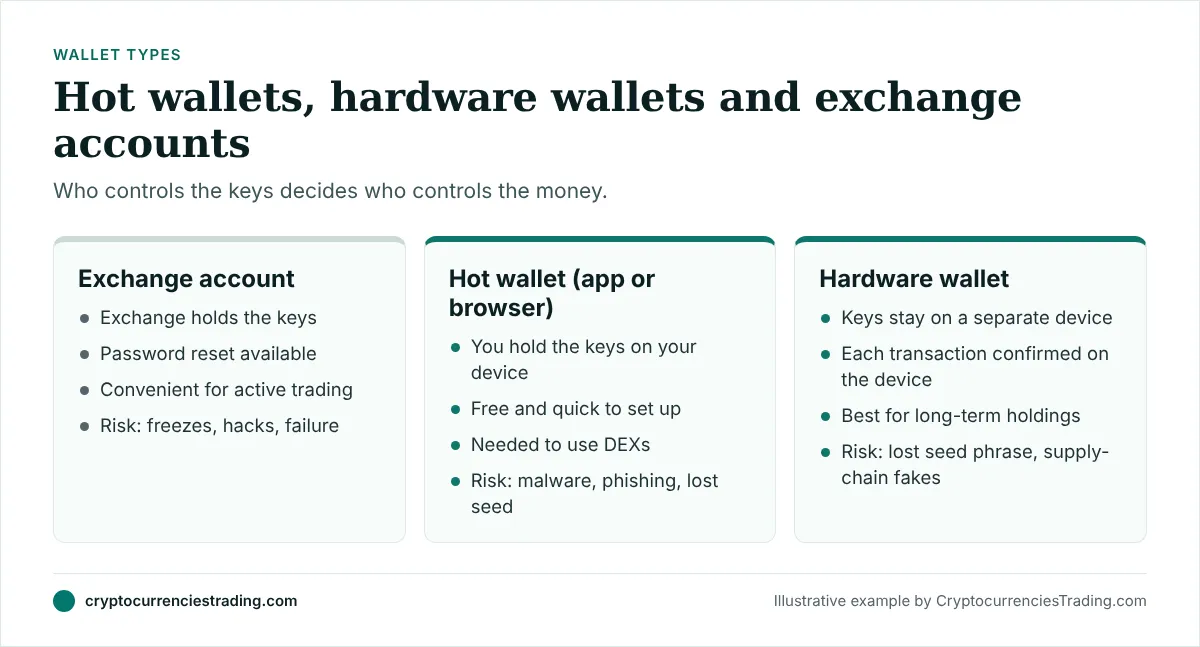
Hot wallets are apps on your phone or browser extensions on your computer, such as MetaMask, Phantom and Rabby. They are free, quick to set up and connect easily to DEXs. The keys live on a device that is also connected to the internet, so malware and phishing are the main risks.
Hardware wallets are small dedicated devices that keep the keys offline. You connect them to a hot-wallet app when you want to sign a transaction, and you confirm each transaction on the device’s own screen. They are the standard choice for long-term holdings.
Smart wallets and social logins are newer options in which a wallet is created for you with an email or social account, sometimes with recovery features. Some perp DEXs, such as Veranta, offer this. Read exactly who controls the keys before relying on one for large amounts.
Choosing a wallet for trading
Pick based on the chains you will use:
- Ethereum and its layer-2 networks (Arbitrum, Base and others): MetaMask and Rabby are common choices.
- Solana: Phantom is the most widely used.
- Hyperliquid: you connect an EVM wallet such as MetaMask or Rabby.
- Several chains: some wallets support both EVM chains and Solana in one app.
Whichever you pick, download it only from the official website or the official app store listing. Type the address yourself; don’t click ads or links in messages. Fake wallet apps and browser extensions are a common way people lose everything before they make a single trade.
Setting up the wallet safely
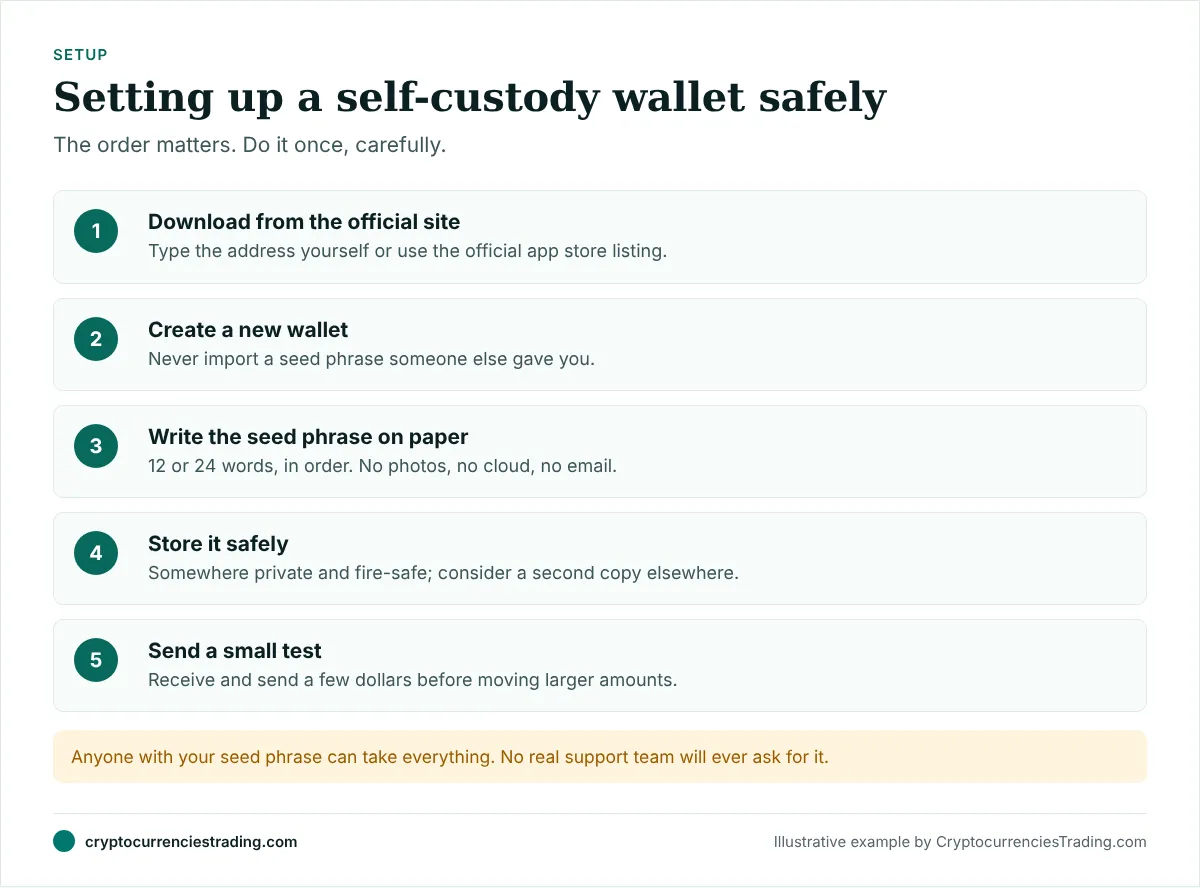
- Install from the official source. Check the developer name in the app store, or the extension’s publisher in your browser’s store.
- Create a new wallet. Never import a seed phrase that someone else gave you or that came pre-printed with a device; whoever wrote it can empty the wallet.
- Write the seed phrase on paper, in order, exactly as shown. Don’t screenshot it, email it, save it in a notes app or cloud drive, or type it into a password manager you don’t fully trust.
- Confirm the backup when the app asks you to re-enter some words. Check your spelling.
- Store it safely. Somewhere private, dry and fire-safe. Many people keep a second copy in another secure location. Metal backup plates protect against fire and water.
- Set a strong app password or PIN. This protects the app on your device; it does not replace the seed phrase.
- Send a small test amount to the wallet and then send part of it back out, so you know both directions work before you move larger sums.
The rule that matters most: no genuine support person, exchange, DEX or wallet will ever ask for your seed phrase. Anyone who asks is trying to steal from you.
Networks, addresses and gas
Many first-time losses come from network confusion, not hacks.
- One address, many networks. On Ethereum-compatible chains, the same address appears on Ethereum, Arbitrum, Base and others. A token sent on Arbitrum is on Arbitrum, and you need to view Arbitrum in your wallet to see it.
- Solana uses different addresses from Ethereum-compatible chains. Never send Solana tokens to an Ethereum address or the reverse.
- Pick the network carefully when withdrawing from an exchange. The network you choose must match a network your wallet supports for that address.
- Keep some gas. Every transaction costs a small network fee paid in the chain’s native token: ETH on Ethereum and most of its layer-2s, SOL on Solana. Without a little of it in your wallet, you can’t move anything else.
Using your wallet on a DEX without getting drained
Connecting to a DEX means letting a website ask your wallet to sign things. Most wallet drains happen here.
- Bookmark real sites and use the bookmarks. Search ads and social media links are a favourite route for fake DEX sites.
- Read what you sign. A swap shows the tokens and amounts. A message asking for “unlimited” spending approval, or a signature with no clear purpose, deserves a second look.
- Understand token approvals. On EVM chains, swapping a token often requires approving a contract to spend it. Some sites request unlimited approvals. Approve only what you need where possible, and revoke old approvals regularly using your wallet’s built-in tools or a reputable approvals checker.
- Check token contract addresses. Anyone can create a token called “USDC”. Use the DEX’s verified list or copy the address from the project’s official website.
- Be wary of airdrops you didn’t expect. Random tokens appearing in your wallet often lead to scam sites when you try to sell them. Ignore them.
- Use simulation and warnings. Some wallets preview what a transaction will do and warn about known scam contracts. Turn these features on.
A safe setup for active traders
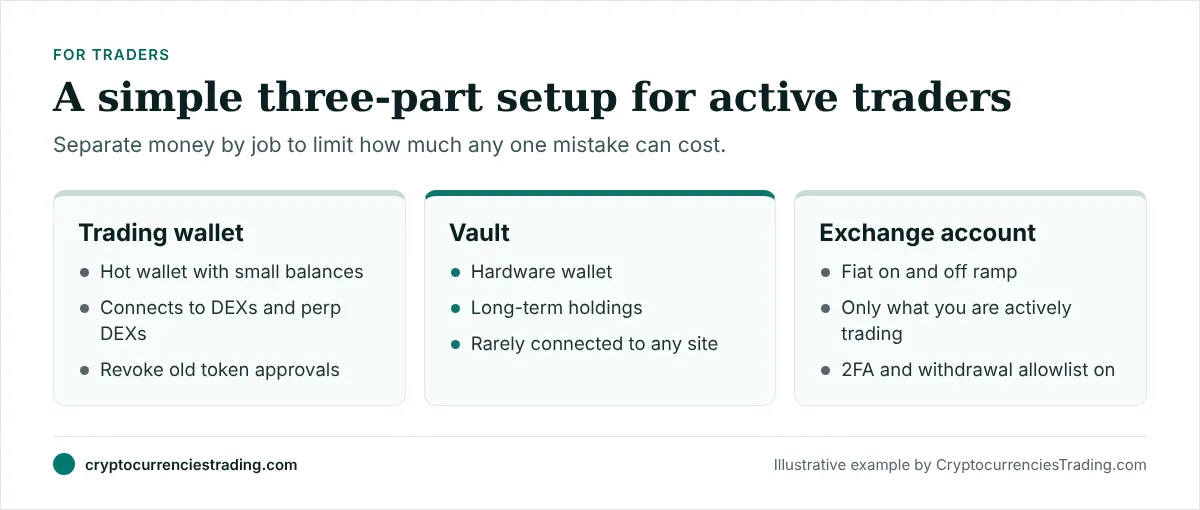
Many experienced traders split their crypto three ways:
- A trading wallet. A hot wallet that connects to DEXs and perp DEXs. It holds only what you are actively using. If a site you connect to turns out to be malicious, this is all you can lose.
- A vault. A hardware wallet holding long-term coins. It rarely connects to anything, and you never use it to try new sites.
- An exchange account. Used to move between bank money and crypto, and for any trading you do on a centralized exchange. Keep balances there low, turn on two-factor authentication and a withdrawal allowlist.
Move profits from the trading wallet to the vault regularly. Top up the trading wallet from the vault only when you need to.
Using a wallet with perp DEXs
Perp DEXs such as Hyperliquid, Lighter and Extended work slightly differently from spot DEXs. You usually deposit collateral (often USDC) into the exchange’s contracts once, and many of them create a trading key or “session key” so you don’t approve every order in your wallet. Your funds remain under the protocol’s smart contracts, and withdrawals return to your wallet.
Things to check:
- Which chain and asset the venue accepts for deposits, and whether a bridge is involved.
- What the session key can do. It should be able to trade but not withdraw to another address.
- How withdrawals work and how long they take.
Our CEX vs DEX guide and perp DEX ranking cover the venues in more detail. And because perps carry liquidation risk, read leverage and liquidation explained before trading them from your wallet.
A monthly security routine
Ten minutes a month keeps most problems away:
- Revoke token approvals you no longer need, on every chain you use.
- Update your wallet app, browser and operating system.
- Move profits from the trading wallet to the vault.
- Check your bookmarks still point to the real sites.
- Confirm your seed phrase backup is where you left it and still readable. Don’t type it anywhere to “test” it.
- Review connected sites in your wallet’s settings and disconnect the ones you don’t use.
Planning for the worst
Self-custody also means thinking about what happens if you can’t access your funds, or someone else needs to. If you are the only person who knows where the seed phrase is, your crypto may be lost to your family if something happens to you.
Some practical options:
- A sealed letter with instructions on where the backup is, kept with your other important papers.
- Splitting knowledge, so that no single person can access the wallet alone but a trusted pair together can.
- Advice from a professional on including digital assets in a will, where you live.
Whatever you choose, never write the seed phrase itself in an email, a will that others will read, or any document stored online.
Self-custody and phishing: the patterns to know
Most thefts from self-custody wallets follow a handful of scripts:
- Fake support. Someone in a chat or social media reply offers help with a wallet problem and asks you to “validate” or “sync” your wallet on a website. The site asks for your seed phrase.
- Fake mints and airdrops. A site promises free tokens if you connect and sign. The signature grants approval to drain a token.
- Lookalike sites. A URL one letter away from a real DEX, often promoted with paid search ads.
- Address poisoning. A scammer sends you a tiny transaction from an address that looks like one you use, hoping you copy it from your history next time. Always copy addresses from a trusted source, not from recent transactions.
What to do if something goes wrong
- You suspect your seed phrase was exposed. Create a brand-new wallet with a new seed phrase immediately and move everything to it. Don’t reuse the old wallet.
- You signed something suspicious. Revoke all token approvals for that wallet straight away, then move remaining funds to a new wallet.
- You sent funds on the wrong network. If you control the receiving address on that network (for example, the same EVM address on another chain), you can often recover them by switching networks in your wallet. If you sent to an exchange on an unsupported network, contact the exchange’s support; recovery is not guaranteed.
- Someone offers to “recover” your funds for a fee. This is almost always a second scam.
Frequently asked questions
Is a self-custody wallet safer than an exchange?
It removes the risk of an exchange failing or freezing your funds, but puts security entirely in your hands. For long-term holdings, a hardware wallet with a well-protected seed phrase is generally considered the safest option.
What happens if I lose my phone?
Nothing is lost if you still have your seed phrase. Install the wallet on a new device and restore it with the phrase. If you lose both the device and the seed phrase, the funds are gone permanently.
Do I need a hardware wallet to trade?
No. Most active trading happens from hot wallets. A hardware wallet is for holdings you don’t need every day.
Can I use one wallet for everything?
You can, but separating a trading wallet from a long-term vault limits the damage if a site you use is malicious.
Why can’t I see tokens I just received?
Usually because the wallet is showing a different network, or the token isn’t added to the wallet’s list yet. Switch to the right network or add the token by its official contract address.
