To send crypto from an exchange to your own wallet, copy the wallet’s receive address for one network, paste it into the exchange’s withdrawal screen, choose that same network, and confirm with two-factor authentication. Send a small test first: Coinbase says it can’t retrieve funds sent to the wrong address or network, and Kraken warns that an incompatible network can mean permanent loss.
Below are the steps for Coinbase and Kraken, shorter notes for OKX and Bybit, and how to receive in Phantom (Solana) and MetaMask (Ethereum and other EVM networks). No wallet yet? Start with our self-custody wallet guide. For the wider picture, see how to move money in and out of crypto.
This is not financial advice. A withdrawal sent to the wrong address or network usually can’t be reversed.
EVM addresses and Solana addresses
Your wallet has a different address for each family of networks, and the exchange needs the one that matches the network you pick.
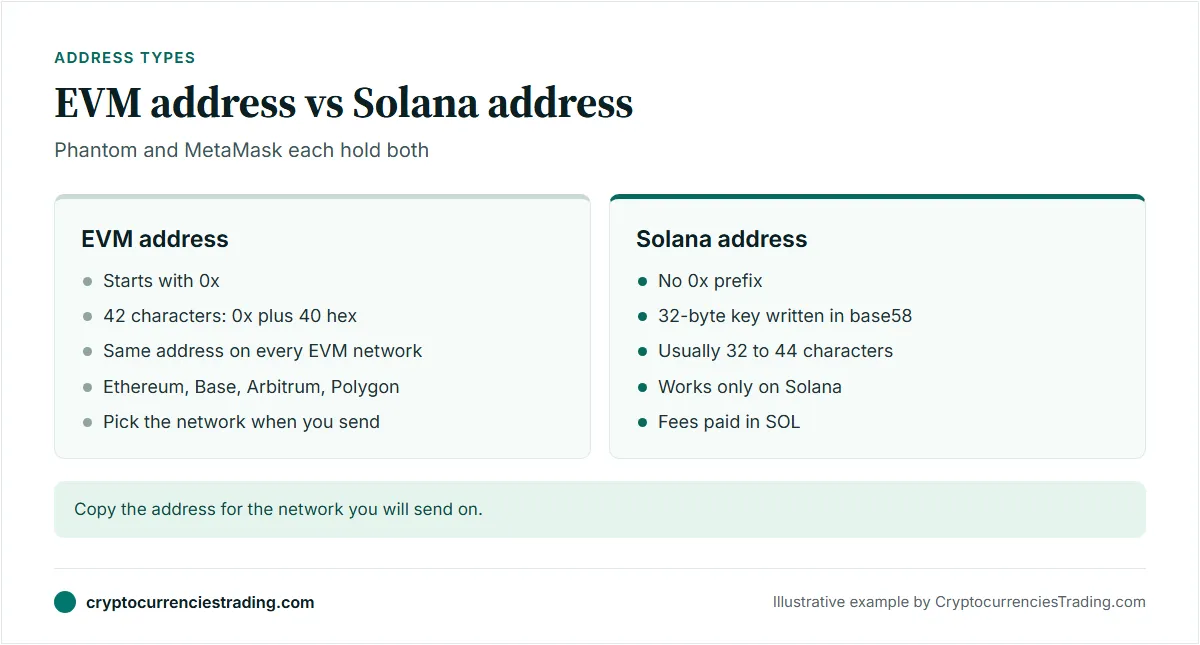
- EVM address. Ethereum and networks built to run like it, such as Base, Arbitrum, Polygon and BNB Chain, share one format:
0xplus 40 hexadecimal characters, 42 in all, as ethereum.org describes. The same address exists on every EVM network, so the network choice still matters: USDC sent on Base arrives on Base. - Solana address. A 32-byte public key written in base58: letters and numbers with no
0xprefix, usually 32 to 44 characters. It works only on Solana.
Both wallets hold both kinds. Phantom’s receive guide says it has a deposit address on each supported network, and that where networks share an address the sender must still select the right one. MetaMask gives each account one EVM, one Solana and one Bitcoin address. Copy the address for the network you will send on, not the first one on screen.
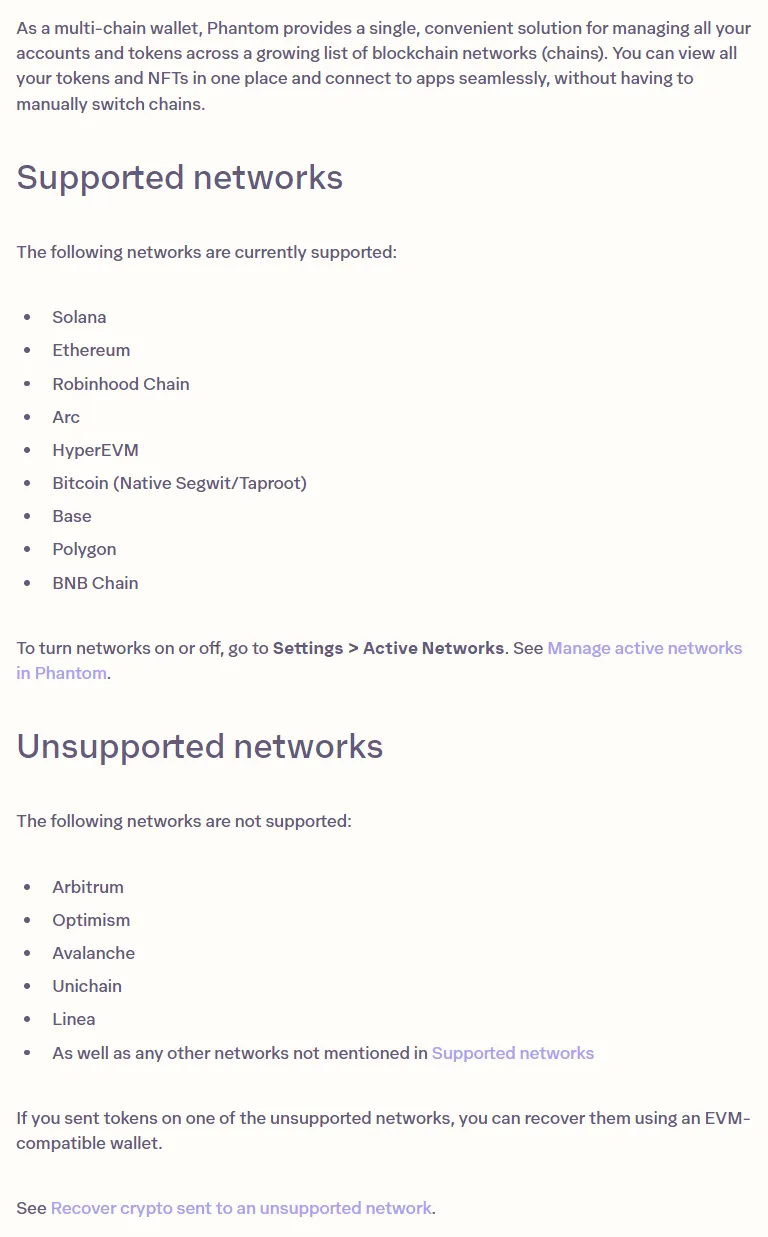
Check that the wallet supports the network, too. Phantom supports Solana, Ethereum, Base, Polygon, BNB Chain, HyperEVM, Robinhood Chain, Arc and Bitcoin, and lists Arbitrum, Optimism, Avalanche, Unichain and Linea as unsupported, along with any network it doesn’t name, though your Phantom Ethereum address looks valid on them. MetaMask does support Arbitrum, Optimism and Avalanche.
Before you send
- Make sure the coins can be sent. Coinbase lets you trade crypto bought with cash still on hold, but not send it until the hold lifts; it points to debit card deposits for instant sends. Kraken holds withdrawals for 72 hours after ACH, PayPal, card or digital-wallet purchases, and for 7 days after ACH Plaid cash deposits. Our card vs bank transfer guide compares the routes.
- Have two-factor authentication ready. All four exchanges ask for a code at some point.
- Choose the network. It must be one both the exchange and your wallet support for that coin. Compare the fee the exchange shows for each.
- Switch it on in the wallet. Phantom turns networks on and off under Settings, Active Networks.
How to send crypto from an exchange to your wallet
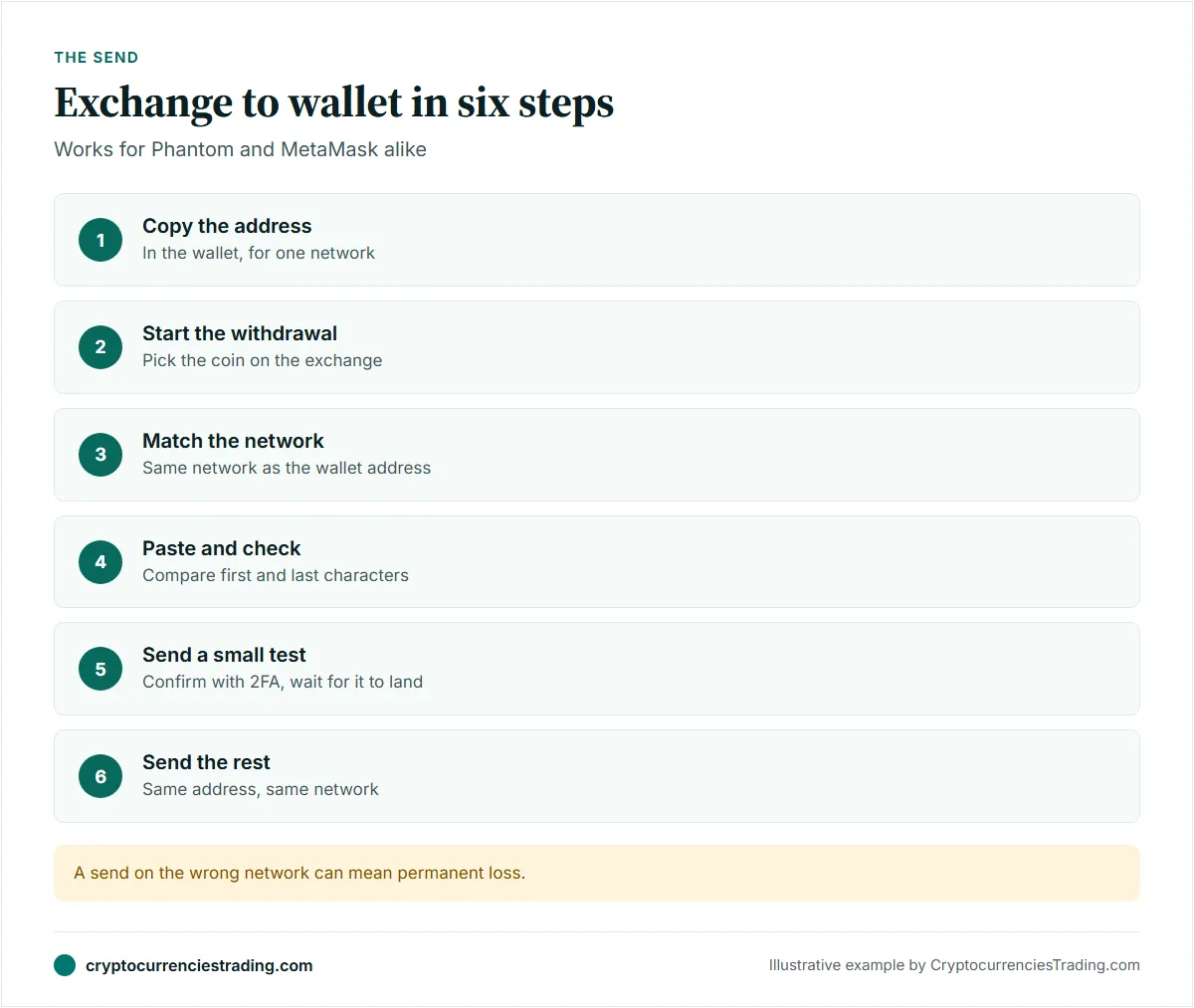
- Copy the receive address. In the Phantom app, tap Deposit, then Receive Crypto, and copy the address for your network; in the extension, click Receive. In MetaMask, tap the copy icon on the mobile home screen, or the network addresses under the account name in the extension, and pick your network.
- Open the exchange’s withdrawal screen and choose the coin.
- Choose the matching network, the same one you picked in the wallet.
- Paste the address and check it. Never type it. Compare the first and last few characters: MetaMask warns that a pasted address that doesn’t match can mean clipboard malware. Don’t copy addresses from your transaction history, where scammers plant lookalikes.
- Check the memo field, fee and minimum, as covered below.
- Send a small test, confirm with your 2FA code and wait until it shows in the wallet.
- Send the rest to the same address on the same network.
On Coinbase
On Coinbase.com, choose Send crypto from the Dashboard, pick the asset and amount, select To and a supported network, then add the address. Select Preview Send, then Send now. In the app, the same send starts from the Pay tab. Coinbase asks for 2-step verification on some higher-value sends but not routine ones.
On Kraken
On kraken.com, go to Portfolio, then Withdraw, pick the crypto and the network, and enter an amount above the minimum. A new address needs a unique label; Kraken approves it at once on a trusted device, otherwise it emails a confirmation link that expires after one hour. If you set up 2FA for funding, use that code, not your sign-in 2FA. Kraken sends no email for the withdrawal itself, so track it in the Activity tab.
On OKX and Bybit
OKX requires identity verification first. Go to Assets, then Withdraw, choose the crypto and the on-chain option, and enter the address. OKX usually matches the network to the address; if it offers several, pick your wallet’s. Check the fee, select Next, complete 2FA and confirm. Completed means the coins have left OKX, not that they have arrived.
On Bybit, go to Assets, then Withdraw, choose the coin and paste an address or pick one from your address book. Selecting the chain shows its fee and minimum. You confirm with an email code and a Google Authenticator code unless the address is verified on your whitelist. By default the fee comes out of the amount you enter.
If the wallet is a stop on the way to a perp DEX, our guide to funding a perp DEX picks up from here. Leveraged positions there can be liquidated.
Memos and destination tags
Some coins, such as XRP and Stellar (XLM), use a tag or memo so an exchange can route deposits from one shared address to the right customer. Coinbase says these generally aren’t needed when you send to a self-custody wallet such as Phantom or MetaMask, because the address is yours alone.
They matter when the destination is an exchange. Coinbase, OKX and Bybit all warn that a missing or wrong memo can delay the transfer or lose the funds.
Withdrawal fees and minimums
Each withdrawal pays a network fee that depends on the coin and network, and most have a minimum. Fees move with congestion, so check the live figures:
- Coinbase charges a fee based on its estimate of current network fees and shows it before you confirm, per its fee disclosures. USDT withdrawals add a 0.01% processing fee, capped at 20 USDT. On a 1,000 USDT send, that is 0.1 USDT plus the network fee.
- Kraken lists a fee and minimum for every coin and network on its withdrawal fees and minimums page, and shows the final fee when you confirm.
- OKX lists minimums and network fees per coin and network on its withdrawal fee page, and says the amount on the withdrawal page is the one that applies.
- Bybit shows both on its deposit and withdrawal status page and in the withdrawal window.
The test send pays a second network fee, small on cheap networks and worth weighing on expensive ones. Once the coins land, keep a little of the network’s own token, SOL on Solana or ETH on Ethereum and most of its layer-2s, so you can move them again. Our guide to network fees and wrong-network sends goes deeper.
Allowlists, holds and waiting periods
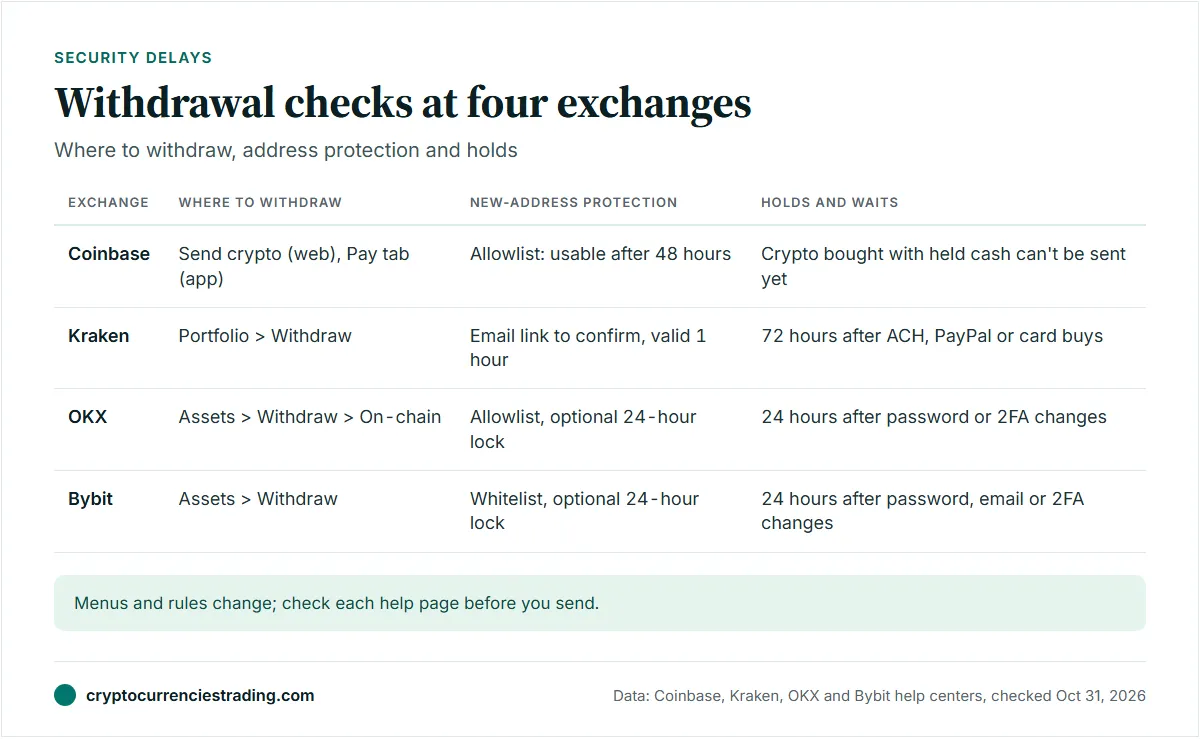
Security delays catch many people out on a first withdrawal:
- Coinbase. Allowlisting limits sends to your address book. A new address becomes usable 48 hours after you add it, and switching allowlisting off also takes 48 hours unless you do it within 8 hours of turning it on. Coinbase may also cap sends temporarily; the cap lifts on its own.
- Kraken. Every new address must be added and confirmed first. The optional Global Settings Lock stops anyone adding a withdrawal address; removing it without a Master Key takes 24 hours to 30 days, as you set. After a password change without sign-in 2FA or a Master Key, withdrawals to new addresses are held for up to 24 hours.
- OKX. The withdrawal allowlist limits withdrawals to saved addresses, and an optional New address withdrawal lock blocks new ones for 24 hours. Withdrawals also stop for 24 hours after you change your login password, phone, email or authenticator, and for 48 hours if OKX flags an address as high-risk.
- Bybit. It offers a Withdrawal Address Whitelist, a Withdraw via Address Book mode and a New Address Withdrawal Lock that blocks new addresses for 24 hours. Changing your password, phone, email, Google Authenticator or passkeys, among other things, restricts withdrawals for 24 hours. Optional Withdrawal Protection delays every on-chain withdrawal by a period you choose.
Turn the allowlist on once your wallet addresses are saved: the wait that slows you down also slows down anyone who breaks into your account.
Travel-rule questions about your wallet
In some regions, travel-rule regulations make exchanges collect details about the other side of a transfer. You may be asked whether the destination is an exchange or a personal wallet, whose it is, and the recipient’s name:
- Coinbase (EU). Since December 30, 2024, EU customers give the recipient’s wallet type, full name and country of residence. Coinbase may ask you to prove you own the wallet by signing a message, a small deposit test or linking Coinbase Wallet. The test needs the wallet to hold the requested amount plus network fees, so a new, empty wallet can’t do it yet.
- Kraken (EU and UK). Above €1,000, you verify ownership of a private wallet by self-certification or a Satoshi test. Kraken says it only allows first-party transfers with self-hosted wallets, and a verified wallet isn’t checked again.
- OKX (EEA). Withdrawals of €1,000 or more to a private wallet need verification by digital signature, which sends no crypto and costs no fee, or a Satoshi test.
- Bybit. Depending on local rules, a Travel Rule window appears after you submit, asking exchange or personal wallet, whose wallet, and the recipient’s type and name. Review can take up to 30 minutes.
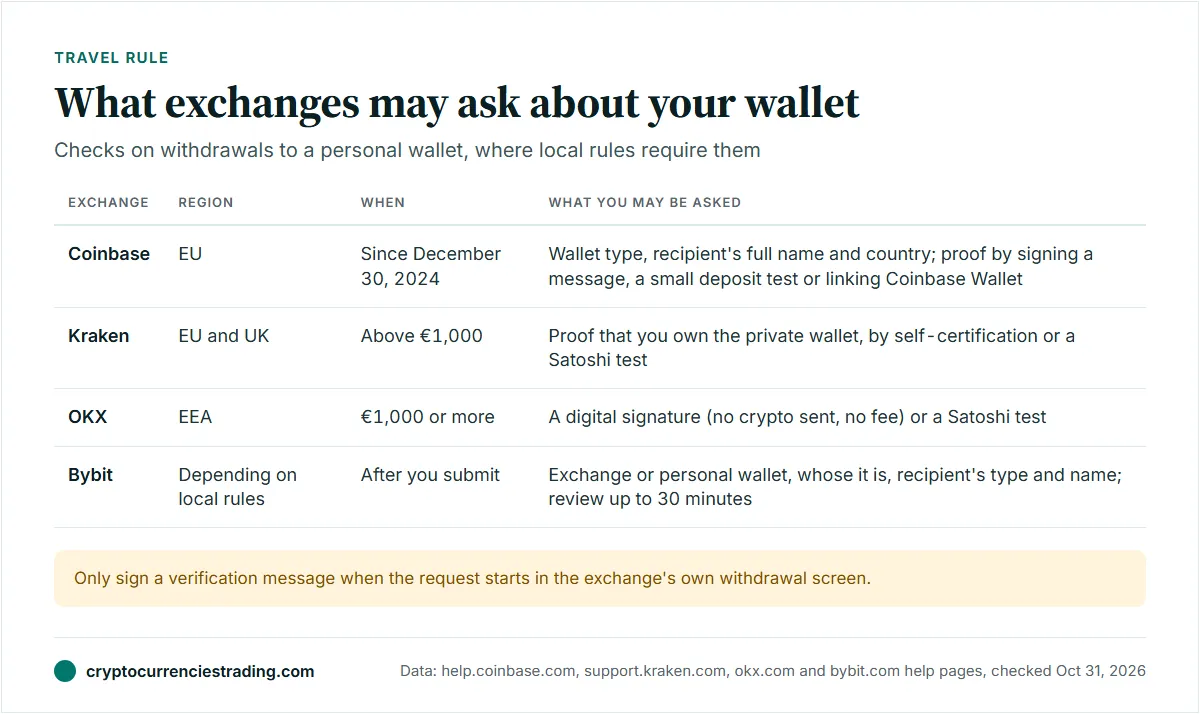
If Phantom or MetaMask is yours, it is a personal wallet that belongs to you. Only sign a verification message when the request starts in the exchange’s own withdrawal screen.
If the coins don’t arrive
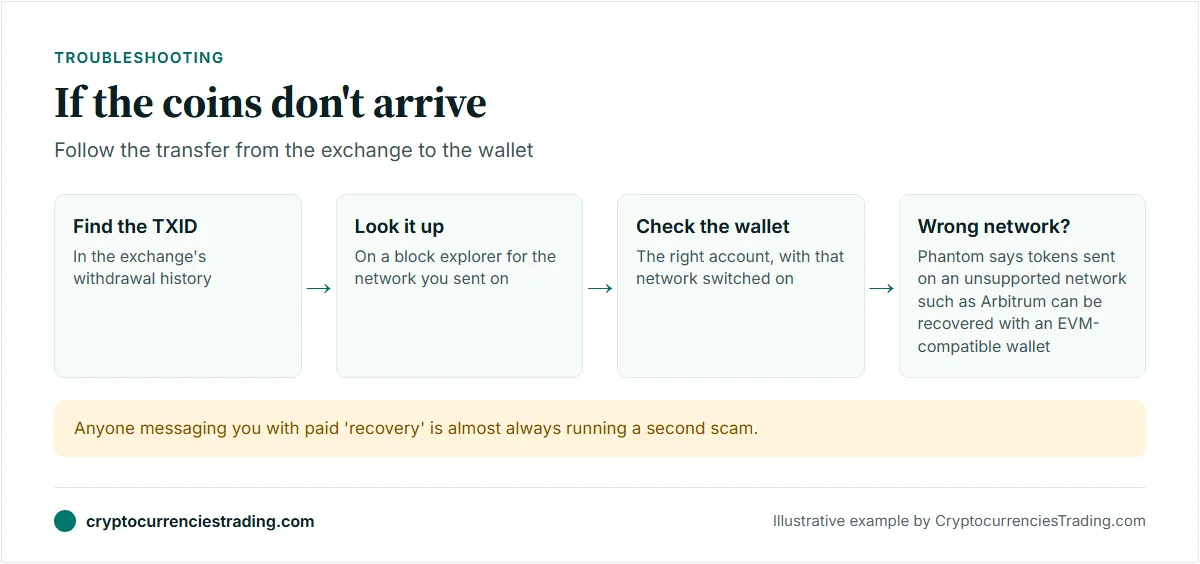
- Check the exchange’s history for the transaction ID (TXID) and look it up on a block explorer for that network.
- Check the wallet view. Each Phantom account has its own addresses, so check the account and that the network is on.
- Wrong network? If you sent to Phantom on an unsupported network such as Arbitrum, Phantom says you can recover the tokens with an EVM-compatible wallet. Our wrong-network guide covers other cases. Anyone messaging you with paid “recovery” is almost always running a second scam.
Still choosing where to trade? See our best crypto exchanges and best crypto trading apps rankings.
Frequently asked questions
How long does a withdrawal from an exchange take?
Often minutes. MetaMask says a transfer from an exchange could take up to 10 minutes, longer when the network is busy, and Phantom notes that exchanges may need extra time and Bitcoin confirms more slowly. Holds, address locks and travel-rule reviews add to that.
Do I need a memo to send to Phantom or MetaMask?
Generally no. Coinbase says tags and memos generally aren’t needed for self-custody wallets, because the address is unique to you. You need one when sending coins such as XRP or XLM to an exchange.
Can I send USDC to Phantom on Arbitrum?
No. Phantom lists Arbitrum as unsupported. Withdraw on Solana or another network Phantom supports, or use a wallet that supports Arbitrum, such as MetaMask. To move USDC between networks, see how to bridge USDC.
How do I send crypto back to the exchange?
Copy the exchange’s deposit address for that coin and network, plus the memo if it shows one, and send from your wallet on the same network. To turn crypto back into cash, see how to cash out crypto.
Sources
The figures in this guide come from these pages, checked on October 31, 2026.
- help.coinbase.com/en/coinbase/trading-and-funding/cryptocurrency-trading-pairs/steps-to-send-crypto
- help.coinbase.com/en/coinbase/trading-and-funding/pricing-and-fees/fees
- help.coinbase.com/en/coinbase/managing-my-account/other/address-book-allowlist
- help.coinbase.com/en/coinbase/trading-and-funding/sending-or-receiving-cryptocurrency/destination-tag-memo-faq
- help.coinbase.com/en/coinbase/trading-and-funding/sending-or-receiving-cryptocurrency/available-balance-faq
- help.coinbase.com/en/coinbase/trading-and-funding/sending-or-receiving-cryptocurrency/send-receive-crypto-eu
- support.kraken.com/articles/360000672763-how-to-withdraw-cryptocurrencies-from-your-kraken-account
- support.kraken.com/articles/360000672863-adding-and-confirming-a-new-cryptocurrency-withdrawal-address
- support.kraken.com/articles/360000767986-cryptocurrency-withdrawal-fees-and-minimums
- support.kraken.com/articles/201396877-what-is-the-global-settings-lock-gsl-
- support.kraken.com/articles/updates-to-crypto-transfer-procedures-for-uk-clients
- okx.com/help/how-do-i-make-a-withdrawal-web
- okx.com/help/how-do-i-enable-allowlist-web
- okx.com/help/i-cant-withdraw-funds
- okx.com/fees/withdrawal-info
- okx.com/en-eu/help/travel-rule-faq-eea
- bybit.com/en/help-center/article/How-to-submit-on-chain-withdrawal-request
- bybit.com/en/help-center/article/How-to-Manage-Your-Withdrawal-Security
- bybit.com/en/help-center/article/FAQ-Crypto-Withdrawal
- bybit.com/en/announcement-info/deposit-withdraw
- bybit.com/en/help-center/article/FAQ-Travel-Rule
- help.phantom.com/articles/receive-crypto-in-phantom-4406393831187
- help.phantom.com/articles/supported-networks-chains-in-phantom-41372840389651
- support.metamask.io/start/how-to-transfer-assets-from-centralized-exchange
- support.metamask.io/configure/wallet/how-to-copy-your-metamask-account-public-address-
- support.metamask.io/configure/accounts/multichain-accounts
- ethereum.org/en/developers/docs/accounts
- solana.com/docs/core/accounts/account-structure
