Money gets into crypto through a centralized exchange: you verify your identity, send a bank transfer or card payment, and buy crypto. From there you either trade on the exchange or withdraw to your own wallet to use a DEX or perp DEX, and the way out runs the same route in reverse, ending with a sale and a withdrawal to your bank.
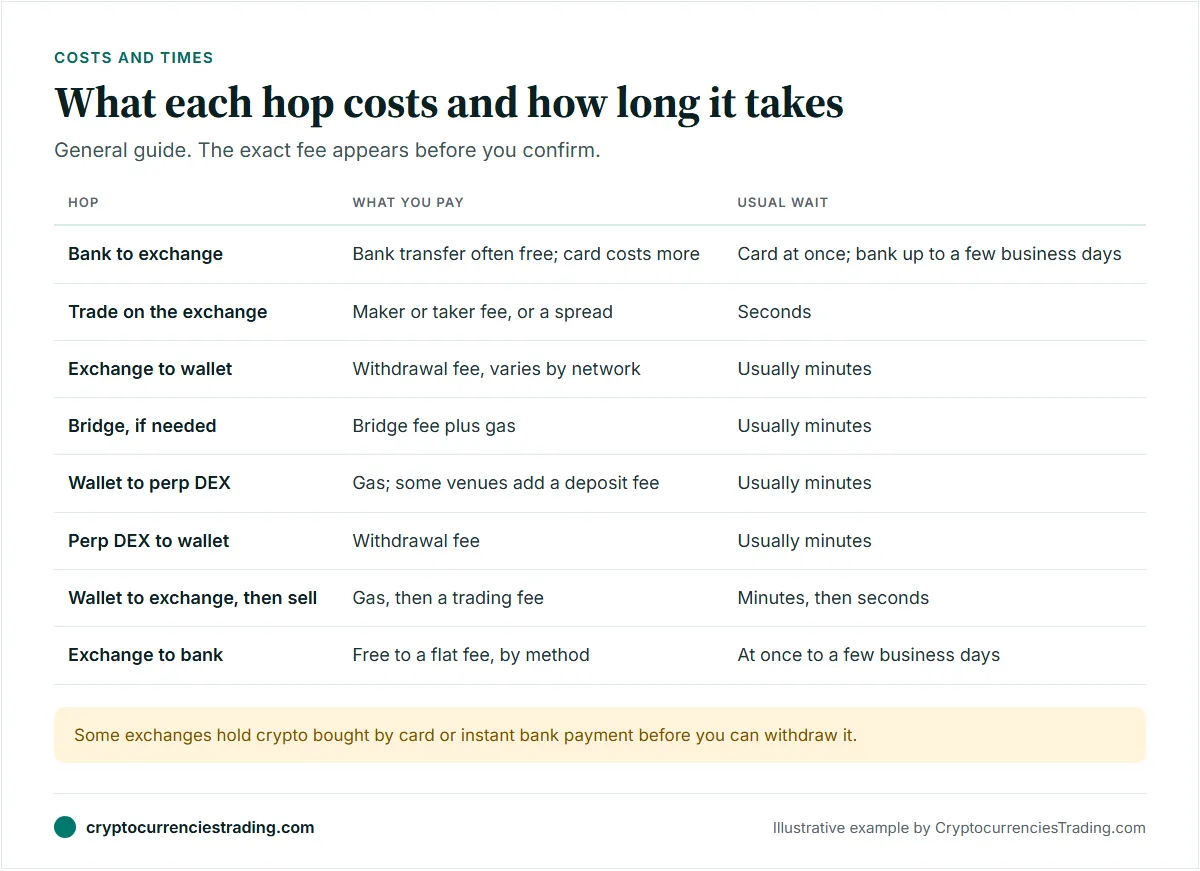
Each hop between those places has its own fee and its own wait. Many costly mistakes happen at the hops rather than in the trades: coins sent on the wrong network, a deposit below a venue’s minimum, a fake website. This guide maps the whole route and points to a detailed guide for each step.
This is not financial advice. Crypto transfers usually can’t be reversed, so one wrong address or network can cost the full amount.
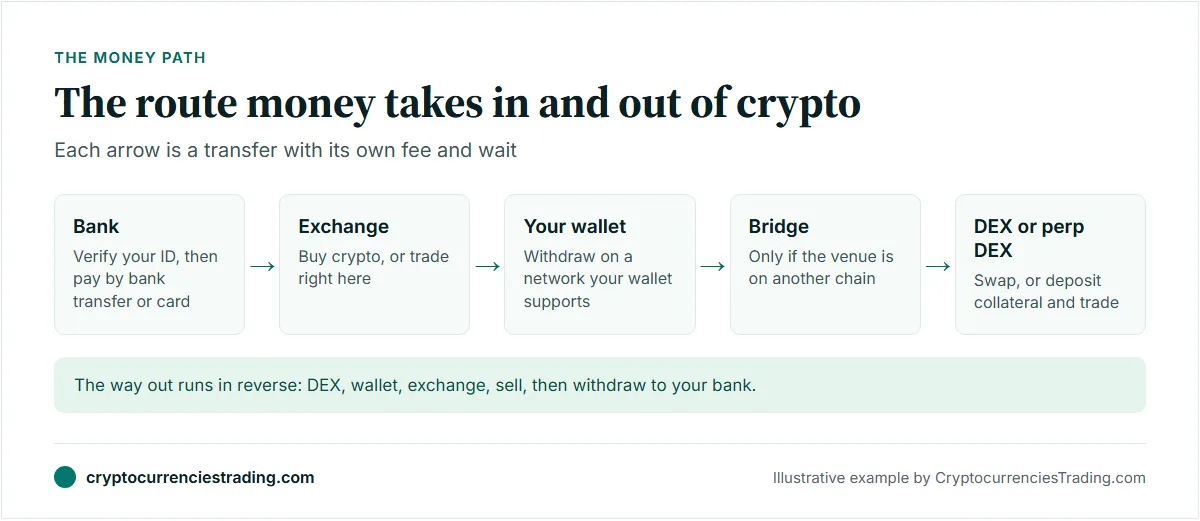
The route at a glance
Not everyone needs every hop. If you buy and hold, or trade only on one exchange, you stop at step 2. If you trade on a DEX or perp DEX, you go the whole way.
- Bank to exchange. Verify your identity, then deposit by bank transfer or card.
- Trade, or withdraw. Trade on the exchange, or send crypto to a self-custody wallet.
- Pick the network. The withdrawal network has to be one the destination supports.
- Bridge, if needed. Only when your destination runs on a different chain.
- Fund the DEX or perp DEX. Swap from your wallet, or deposit collateral.
- Come back out. Withdraw to your wallet, send to an exchange, sell, and withdraw to your bank.
Step 1: Get bank money into an exchange
Verify your identity first
Exchanges that take bank money check who you are before you can deposit or trade. Coinbase, Kraken, OKX and Bybit all require identity verification, usually a government ID plus a selfie or face scan. Do it a few days before you need to move money, because a check that stalls can’t be hurried.
Check first that the exchange serves your country. Bybit, for example, excludes the US, and US users of OKX get a separate service with its own fees. Our best crypto exchanges ranking and the country guides for the US, UK and Europe show who serves where.
Bank transfer or card
A bank transfer is usually the cheapest way in. A card is faster and costs more. Some examples from exchange fee pages:
- Bitvavo (EEA residents only): SEPA transfer, iDEAL | Wero and Bancontact deposits are free. Apple Pay, Google Pay, credit card and PayPal cost 1%, and EPS costs 1.75%.
- Gemini (US dollars): ACH and wire deposits are free. A debit card costs 3.49% and PayPal 2.50%.
- Bitget: euro deposits by SEPA and dollar deposits by SWIFT are free.
- KuCoin: euro deposits by SEPA cost 1 EUR each.
Timing depends on the payment rail. Card payments are usually credited at once. Bank transfers take anything from seconds to a few business days: Bitget’s deposit guide says SEPA deposits typically take 1 to 3 working days. Your own bank may also charge you to send a wire.
Fast money can come with a catch. Kraken’s support center says it holds crypto withdrawals for 72 hours after purchases by ACH, PayPal, card or digital wallets such as Apple Pay, and for 7 days after cash deposits by ACH through Plaid. Kraken’s own pages differ on that last point: its withdrawal-hold article puts the 7-day hold on purchases made through Plaid ACH instead. The tooltip in Kraken’s withdrawal screen shows any hold on your account. You can keep trading during a hold, but you can’t withdraw that amount. If you plan to move coins to a wallet the same day, a hold will stop you.
Our guide to buying crypto by card or bank transfer compares the two in more detail.
Step 2: Trade on the exchange, or move to your own wallet
Once your money is in, you can trade right there. The cost is a trading fee, and the screen you buy on changes it a lot:
- Simple buy screens quote one price with a spread built in, plus a fee. Kraken’s app charges 1% plus a spread for an instant buy.
- Order-book screens charge a maker or taker fee instead. Kraken Pro starts at 0.40% maker and 0.80% taker, Coinbase Advanced at 0.50% and 0.90% in the US, and OKX at 0.08% and 0.10% on its global site.
Trades settle in seconds. Our guide to maker vs taker fees explains why a limit order usually costs less.
Move crypto to a self-custody wallet when you want to use a DEX or perp DEX, or to hold coins you aren’t trading. A wallet such as MetaMask for Ethereum-style chains or Phantom for Solana keeps the keys on your device. No exchange can freeze those funds, and nobody can recover them for you either. Our CEX vs DEX guide covers the trade-off, and the self-custody wallet guide shows how to set one up before you withdraw anything.
The withdrawal costs a network fee that the exchange sets per coin and network, shown before you confirm. Most withdrawals arrive within minutes, depending on the network and how many confirmations the exchange waits for. The step-by-step version is in how to send crypto from an exchange to a wallet.
Step 3: Choose the network
The same coin often exists on several networks. USDC, for example, is issued on Ethereum, Arbitrum, Base, Solana and others. When you withdraw, the exchange asks which network to use, and that choice decides where the coins land.
Three rules keep you safe:
- The destination must support that network. Phantom supports Solana, Ethereum, Base, Polygon and several other networks, but not Arbitrum. USDC sent to your Phantom address on Arbitrum won’t show up in Phantom.
- Address formats differ. Ethereum-style chains share one address format, and Solana uses another. Never send Solana tokens to an Ethereum address, or the reverse.
- Keep gas on the chain you send from. Each network charges fees in its own token: ETH on Ethereum and Arbitrum, SOL on Solana. Hyperliquid’s docs, for example, say a USDC deposit from Arbitrum needs ETH on Arbitrum to pay the gas.
Fees differ a lot between networks, and the cheapest one only helps if your destination accepts it. Our guide to network fees and wrong-network transfers compares them and explains what to do if you pick the wrong one.
Step 4: Bridge when the destination chain differs
A bridge moves tokens from one chain to another. You need one only when you can’t withdraw from the exchange straight to the chain your destination uses. If the exchange offers that network, a direct withdrawal is usually simpler and cheaper than withdrawing and then bridging.
There are two common kinds:
- Native transfers for USDC. Circle’s Cross-Chain Transfer Protocol (CCTP) burns USDC on the source chain and mints the same amount on the destination, without liquidity pools. Hyperliquid’s bridge docs name CCTP as the preferred way to bring USDC onto Hyperliquid.
- Third-party bridges and cross-chain swaps. Wallets often route these for you. Phantom says its cross-chain swaps run through LI.FI, Relay, deBridge and Garden. Its cross-chain guide shows the bridge provider’s fee in the Network fee line of the mobile Buy/Sell flow, or as a separate Cross Chain Swap Fee line on the Trade screen.
You pay gas on the source chain plus the bridge’s own fee or spread. Most routes take minutes, and the bridge shows an estimate before you confirm. Bridges hold large pools of funds, which makes them targets for hackers and for fake lookalike sites, so use a bridge your wallet integrates or open one from a saved bookmark. Our guide on how to bridge USDC walks through a transfer.
Step 5: Fund a DEX or perp DEX
Spot DEXs such as Uniswap or Jupiter need no deposit. You connect your wallet and swap, paying the network fee plus the swap fee. Swapping inside a wallet app adds the wallet’s own fee: 0.875% per swap in MetaMask and 0.85% on most swaps in Phantom.
Perp DEXs need collateral, usually USDC, deposited into the venue. On Hyperliquid:
- Where from. Its onboarding docs say a connected wallet deposits USDC on Arbitrum, and an email login gets a deposit address that also takes USDC on Ethereum, Base or Polygon.
- Minimum. Its bridge docs say the minimum deposit is 5 USDC, and a smaller deposit is not credited and is lost for good.
- Time. The same page says deposits through the Arbitrum bridge are credited in under a minute.
Wallets can make the deposit for you. MetaMask’s perps balance takes at least $10, and its help center says funding usually takes about 30 seconds. Phantom converts SOL or another Solana token to USDC and bridges it to Hyperliquid. Its perps guide says the first deposit costs a flat 1 USDC charged by Hyperliquid, and later ones a 0.07% Hyperliquid spot swap fee plus the network fee.
Check availability before you deposit. Hyperliquid’s terms exclude the US, and MetaMask and Phantom don’t offer perps in the US or the UK. Our perp DEX availability guide has the details, and the perp DEX ranking compares venues.
Perps carry liquidation risk. If the price moves far enough against a leveraged position, the venue closes it and you can lose all the margin behind it. Read leverage and liquidation explained before a first trade. The full walkthrough is in how to fund a perp DEX.
The way back out
Getting out runs the same route backwards, and each hop costs something again. Moving money in and out often adds up, so plan the round trip before you start.
1. Withdraw from the DEX to your wallet
On a spot DEX your tokens are already in your wallet. On a perp DEX, close or reduce your positions, then withdraw the collateral. Hyperliquid’s bridge docs say withdrawals reach your wallet in 3 to 4 minutes, and its support FAQ says a withdrawal needs 1 USDC. Through MetaMask, the help center gives the same flat $1 fee. Its mobile steps let you choose the token and chain you receive, while the extension pays out USDC on Arbitrum. Through Phantom, the first withdrawal costs a flat 1 USDC and later ones the 0.07% swap fee plus the network fee.
2. Send to an exchange on a supported network
Open the exchange’s deposit page, choose the coin and check which networks it accepts for that coin. Send only on one of those. Some coins also need a memo or tag, and the deposit page will say so. A deposit on an unsupported network may be recoverable only through the exchange’s support, if at all. You pay gas on the sending chain, and the exchange credits the deposit after its required confirmations, usually within minutes.
3. Sell
Selling costs a trading fee, and pairs quoted in fiat money can cost more than crypto pairs. At Bybit, fiat-crypto pairs cost 0.15% maker and 0.20% taker below $100,000 of 30-day spot volume, against 0.10% on crypto pairs. KuCoin charges 0.1% to sell crypto into a fiat balance. A simple sell screen adds a spread, just as a simple buy does.
Selling can be a taxable event. Whether you owe tax, and how much, depends on your country, so check with a local tax adviser.
4. Withdraw to your bank
Bank withdrawal fees range from free to a flat charge:
- OKX Europe: euro withdrawals by SEPA are free for EEA residents. OKX’s help page says funds generally arrive instantly or within 2 business days, depending on your bank, and a first withdrawal to a new bank account needs a deposit from that account first, to prove you own it.
- Bitvavo: euro withdrawals are free and go only to a linked bank account.
- Bitget: 1 EUR by SEPA, 30 USD by SWIFT.
- KuCoin: 1 EUR by SEPA, 2.6 BRL by Pix.
- Gemini: ACH withdrawals are free, and a USD wire costs $25.
Bybit lists SEPA, FPS, Pix, SWIFT and local bank transfers in several currencies, with methods varying by country. Withdraw to an account in your own name. Our guide on how to cash out crypto goes through it step by step.
Safety checklist
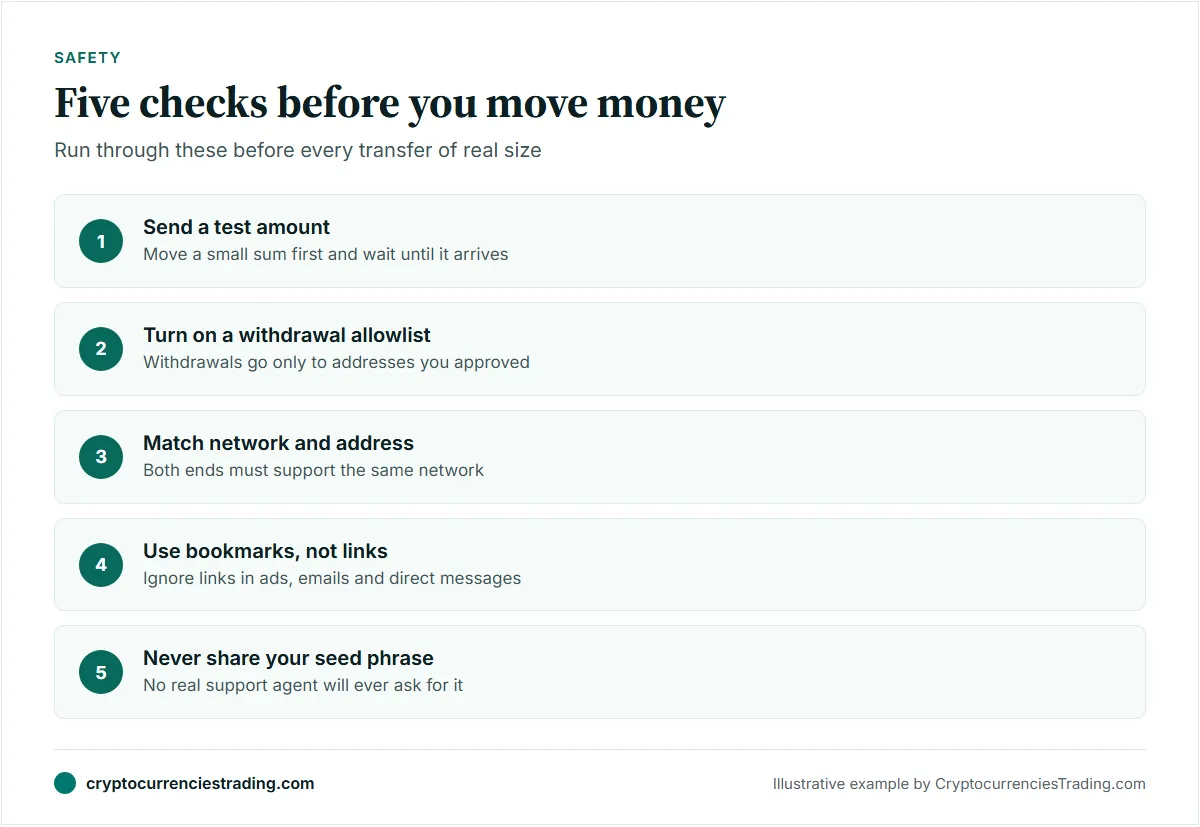
- Send a test transfer. Move a small amount first and wait until it arrives before you send the rest. Mind the minimums: a test below Hyperliquid’s 5 USDC minimum would be lost.
- Turn on a withdrawal allowlist. OKX and Coinbase let you limit withdrawals to addresses you approved in advance, and Kraken asks you to confirm a new withdrawal address by email. After a password change, Kraken holds withdrawals to new addresses for up to 24 hours.
- Match the network and address on both ends. Copy the address from the destination itself, not from your transaction history, where scammers plant lookalike addresses.
- Watch for phishing. Open exchanges, wallets, bridges and DEXs from bookmarks, not from ads, emails or direct messages. Treat anyone offering “support” in a chat as a scammer until proven otherwise.
- Never share your seed phrase. No exchange, wallet, DEX or support agent will ever ask for it. Anyone who does is trying to take your funds.
Frequently asked questions
How long does it take to get from a bank account to a perp DEX?
It depends mostly on the bank side. A card payment is credited at once, while a bank transfer can take a few business days, and some exchanges hold freshly bought crypto before you can withdraw it: Kraken, for example, holds withdrawals for 72 hours after card or ACH purchases and 7 days after ACH cash deposits through Plaid. Once the crypto can be withdrawn, the exchange withdrawal, any bridge and the deposit into the venue usually take minutes each.
What is the cheapest way to move money into crypto?
Usually a local bank transfer such as SEPA or ACH, which several exchanges accept free, followed by a limit order on the order book rather than a simple buy screen. Cards and PayPal are faster but cost more: 1% at Bitvavo, and 3.49% for a debit card at Gemini.
Can I send crypto from an exchange straight to a perp DEX?
Only if the venue gives you a deposit address and says it accepts transfers that way. Otherwise, withdraw to your own wallet first, then deposit with the venue’s Deposit button, on a network it supports and above its minimum.
What happens if I send crypto on the wrong network?
If you control the receiving address on that network, you can often recover the funds by switching networks in your wallet. If you sent them to an exchange on a network it doesn’t support, contact its support; recovery is not guaranteed. Our wrong-network guide explains the options.
Do I pay tax when I cash out?
It depends on where you live. Selling crypto for cash, and in some countries swapping one coin for another, can count as a taxable event. Keep a record of every deposit, trade and withdrawal, and ask a local tax adviser.